
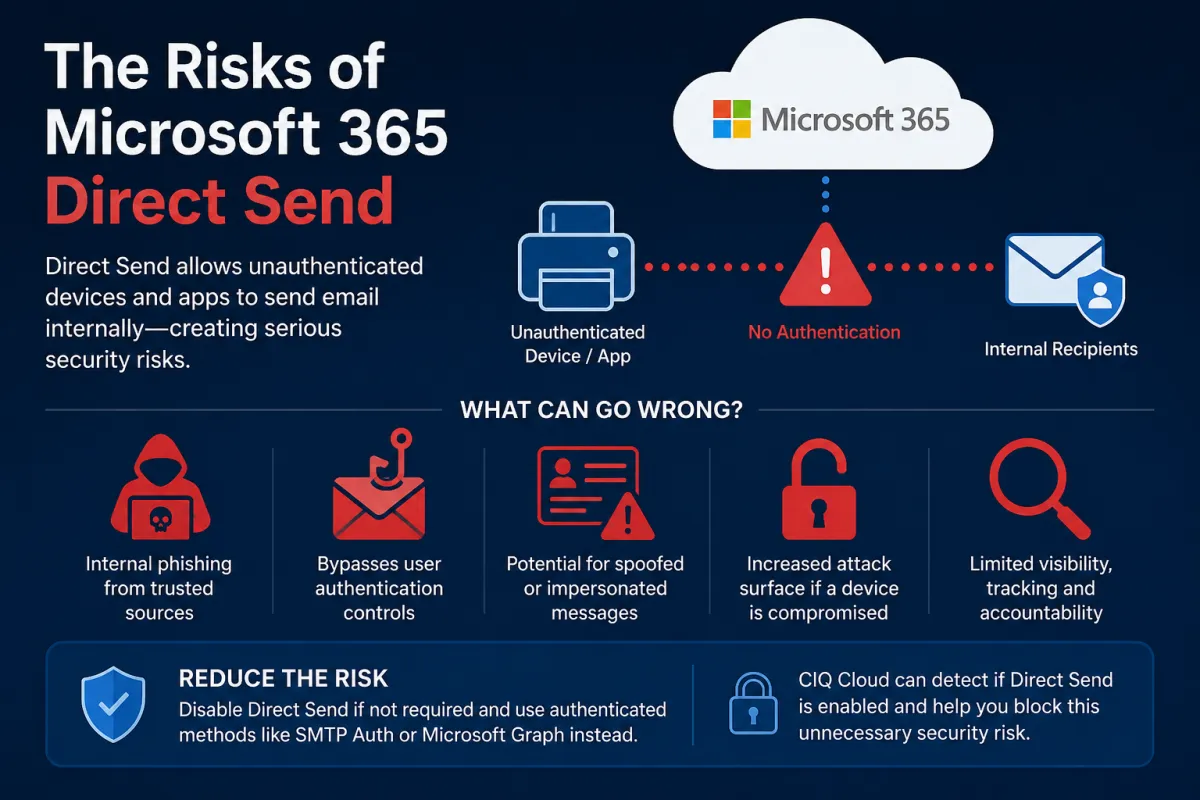
Microsoft Direct Send - Security Vulnerability
A Hidden Email Security Risk Every Organisation Should Address
Microsoft Direct Send - Security Vulnerability
Email remains one of the most heavily targeted attack vectors for cybercriminals, and while organisations invest heavily in phishing protection, anti-malware and user awareness training, many overlook a built-in Microsoft 365 feature that can undermine those security investments: Microsoft Direct Send.
Although Microsoft Direct Send was designed to simplify email delivery for devices and applications, it can also introduce unnecessary risk if left enabled without a genuine business requirement. Understanding how Direct Send works, the risks it presents, and how to identify and disable it should form part of every organisation's Microsoft 365 security posture.
What is Microsoft Direct Send?
Microsoft Direct Send allows devices, applications and services to send email directly to recipients within your Microsoft 365 tenant by connecting to your Exchange Online endpoint without requiring mailbox authentication.
Typical examples include:
Multi-function printers sending scanned documents
Building management systems
Monitoring platforms generating internal alerts
Legacy applications that cannot authenticate using modern authentication methods
Unlike authenticated SMTP submission, Direct Send does not require a username and password. Instead, the sending device connects directly to Exchange Online and delivers messages to internal recipients.
While convenient, this authentication-free approach also creates an opportunity for abuse.
Why is Direct Send a Security Vulnerability?
The primary concern is that Direct Send removes one of the most important security controls in modern email systems: authentication.
If an attacker gains access to your network—or compromises a vulnerable device capable of reaching Exchange Online—they may be able to generate convincing internal emails without needing valid Microsoft 365 credentials.
Potential attack scenarios include:
Sending convincing phishing emails appearing to originate from executives or IT administrators.
Delivering malicious links to employees that appear to come from trusted internal systems.
Generating fake password reset notifications.
Creating fraudulent finance or payroll requests.
Bypassing some security processes that rely on authenticated user activity.
Although Direct Send only delivers mail internally within your tenant, internal phishing attacks are often more successful because employees naturally place greater trust in messages that appear to originate from colleagues or internal systems.
For organisations pursuing standards such as Cyber Essentials, ISO 27001 or following Microsoft's own security recommendations, reducing unnecessary attack surface is a key principle. If Direct Send is not required, disabling it removes another opportunity for attackers.
When Should Direct Send Be Used?
For many organisations, the answer is simple: it shouldn't.
Microsoft now provides more secure alternatives including:
Authenticated SMTP submission
Microsoft Graph API
Azure Communication Services
Modern authenticated mail relay solutions
These methods provide authentication, auditing, improved security controls and better visibility into sending activity.
Only organisations with specific legacy devices that cannot support authenticated email should consider retaining Direct Send, and even then it should be tightly controlled and regularly reviewed.
How CIQ® Cloud Identifies the Risk
One of the challenges with Microsoft 365 security is simply knowing which settings have drifted away from best practice.
CIQ® Cloud continuously analyses Microsoft 365 tenant configuration and identifies security weaknesses before they become incidents.
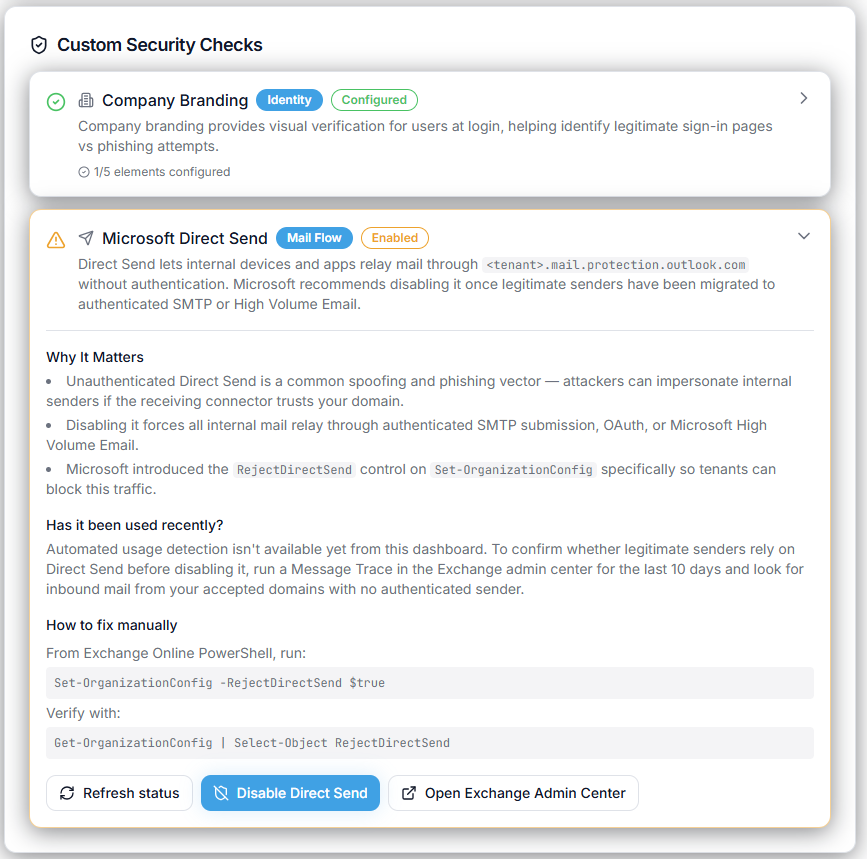
As part of the Custom Security Checks within the Microsoft 365 Security and Compliance assessments, CIQ Cloud checks whether Microsoft Direct Send remains enabled and determines whether it represents an unnecessary security exposure.
Rather than requiring administrators to manually inspect Exchange Online configuration, CIQ Cloud automatically highlights the issue within its security dashboard, allowing IT teams and Managed Service Providers (MSPs) to quickly identify tenants that require attention.
This proactive approach means security weaknesses can be identified during routine operational reviews instead of after a security incident.
Blocking the Vulnerability with CIQ Cloud
Detecting a vulnerability is only half the solution.
CIQ Cloud not only identifies that Direct Send is enabled but also provides clear remediation guidance to help administrators remove the risk safely.
Security teams can:
Identify tenants where Direct Send remains enabled.
Determine whether any legitimate business systems still depend upon it.
Prioritise remediation based on organisational security policy.
Validate that changes have been successfully implemented.
Continuously monitor to ensure the setting is not inadvertently re-enabled.
This transforms what would otherwise be a manual audit into an ongoing security control.
For MSPs managing multiple Microsoft 365 tenants, CIQ Cloud provides a consistent method of assessing every customer against the same security baseline, ensuring vulnerabilities such as Direct Send are not overlooked during onboarding or quarterly security reviews.
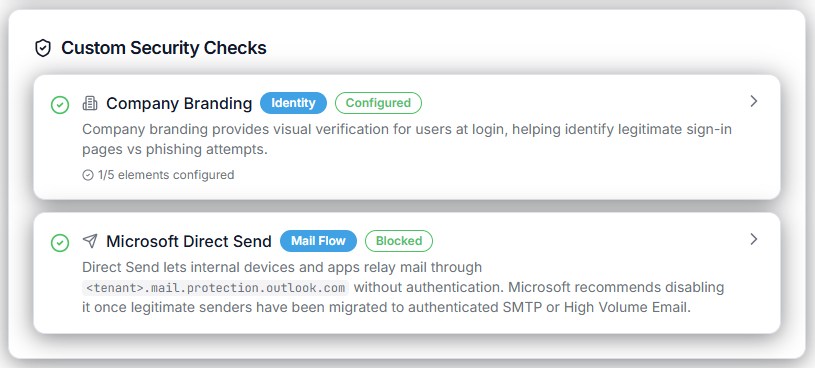
If you want to take the DIY approach and use Powershell to disable Direct Send, then follow our Step by step guide to disabling Microsoft Direct Send.
Continuous Security Monitoring Matters
Microsoft 365 evolves continuously, with new features, configuration changes and security recommendations appearing throughout the year. Security should therefore be viewed as a continuous process rather than an annual audit.
By continuously monitoring tenant configuration, identifying risky settings such as Microsoft Direct Send, and providing actionable remediation guidance, CIQ Cloud helps organisations strengthen their Microsoft 365 security posture while reducing operational effort.
Removing unnecessary services, reducing the available attack surface and ensuring security settings remain aligned with best practice are among the simplest and most effective ways to reduce cyber risk.
If your organisation no longer relies on Microsoft Direct Send, disabling it is a straightforward security improvement. With CIQ Cloud continuously assessing your Microsoft 365 environment, you can quickly identify this and many other hidden security risks before attackers have the opportunity to exploit them.