MSP Remote Access Security: Who Can Access Your Devices? | CIQ Cloud
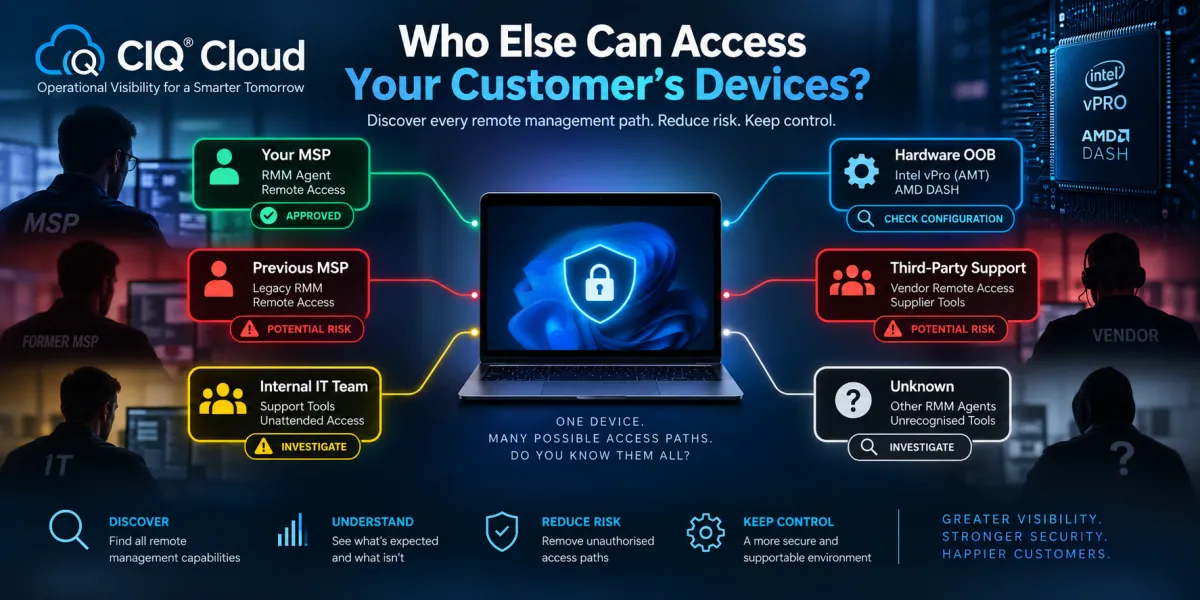
Who Else Can Access Your Customer’s Devices? The Hidden Remote Management Risk
MSP Remote Access Security: Who Can Access Your Devices?
When an MSP takes responsibility for a new customer, one of the first tasks is usually deploying its management tools and establishing remote access.
But there is another question that may be considerably more important:
Who else can still access those devices?
A customer's computers may contain remote monitoring and management agents, unattended remote-access applications and hardware-level Out-of-Band (OOB) management capabilities accumulated over several years.
Some will be legitimate. Some may belong to an internal IT team. Others may have been installed by a previous MSP, software supplier or support company.
And some may simply have been forgotten.
New CIQ® Cloud analysis capabilities are designed to provide MSPs with greater visibility into this often-overlooked remote management attack surface by analysing RMM agents, remote-access software and potential hardware-level management capabilities including Intel vPro and AMD DASH.
The objective isn't simply to determine whether a device can be remotely managed.
It is to help answer a much more important security question:
Who potentially has a route into this device?
Remote management is privileged access
RMM and remote-access tools are deliberately powerful, they have to be.
An RMM platform may allow a technician to execute scripts, install software, change configuration, transfer files, create accounts and initiate remote-control sessions.
An unattended remote-access product can potentially allow somebody thousands of miles away to interact with a computer as though they were sitting in front of it.
Hardware-level OOB management can go further still by providing management capabilities independently of the operating system.
These are extremely valuable capabilities when properly controlled.
But every legitimate remote-management capability also represents a potential privileged access path.
That makes understanding which remote-management technologies exist across an endpoint estate an important part of understanding its security posture.
The MSP takeover problem
Consider a common situation, a business decides to change MSP.
The new MSP takes over Microsoft 365, deploys its RMM agent, installs its preferred security tools and establishes its own remote-access platform.
The previous MSP confirms that the customer has been removed from its systems.
Has its access actually gone?
Hopefully.
But how does the new MSP verify that?
Perhaps the previous MSP's primary RMM agent has been removed, but another remote-support application remains installed.
Perhaps a legacy RMM agent from an MSP that supported the organisation three years earlier is still present on several machines.
Perhaps a software supplier installed an unattended remote-access application to support a specialist application. Or perhaps hardware-level management has previously been provisioned on devices supporting Intel vPro.
Simply installing the new MSP's management stack does not answer any of these questions.
You need visibility into what was already there.
Discovering the remote management attack surface
CIQ Cloud can analyse endpoint information to identify recognised categories of remote-management technology.
This includes RMM agents and associated management software, remote-access applications and hardware characteristics that indicate potential support for OOB technologies such as Intel vPro and AMD DASH.
Rather than viewing these individually, the more useful approach is to consider them collectively as the customer's remote management attack surface.
For every endpoint, an MSP should ideally be able to answer:
What remote-management technologies are present?
Which of them are approved?
Who owns or controls them?
Are any unexpected?
Are there capabilities that require further investigation?
That turns software and hardware inventory into actionable security intelligence.
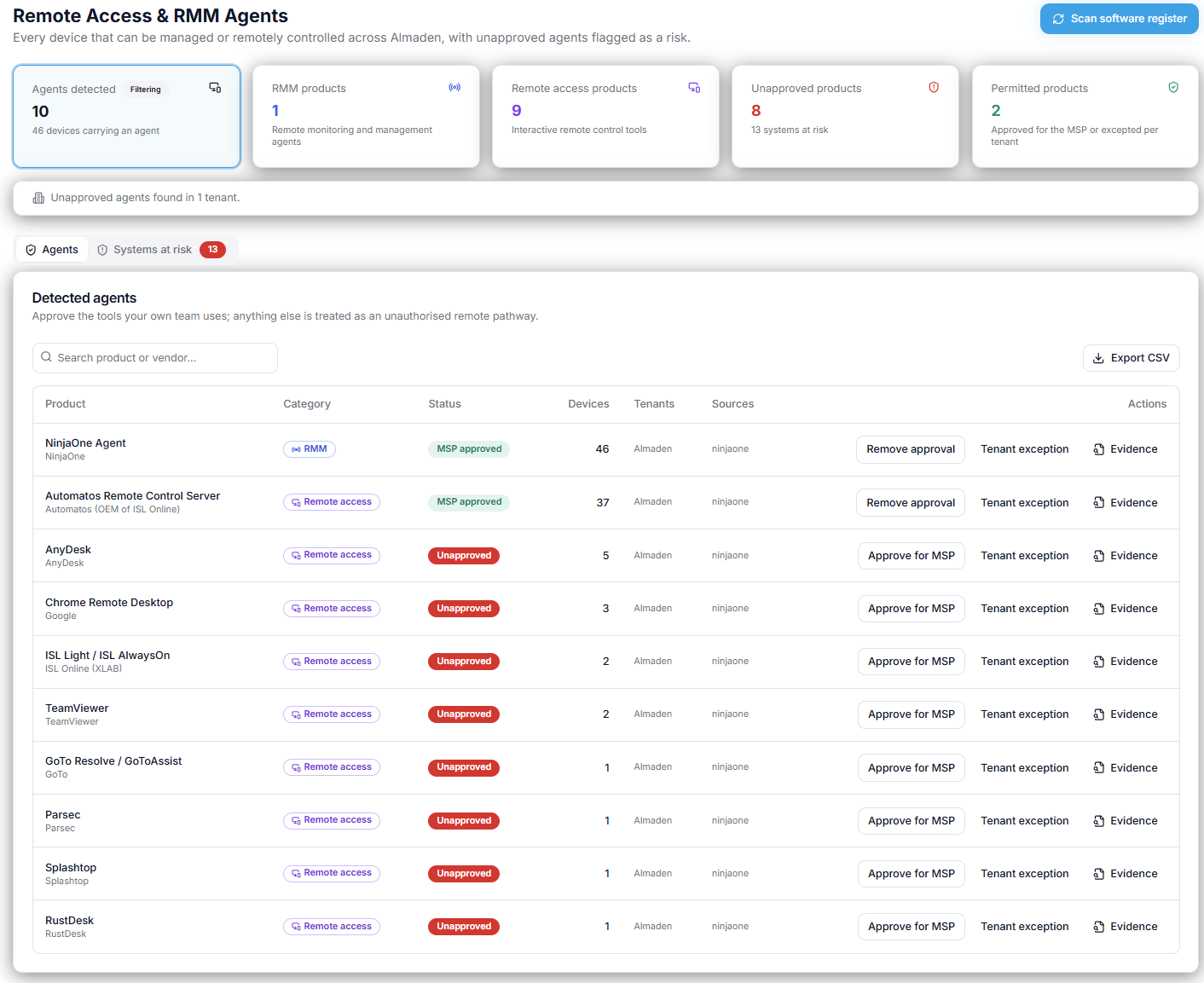
Finding old RMM agents
Legacy RMM agents are particularly interesting during MSP transitions. Over its lifetime, a business may have used several MSPs or internal IT suppliers. Each will have deployed its own tooling.
Migration processes are rarely perfect.
A laptop may have been offline during the previous provider's agent-removal process. A device in storage may return to service months later. An employee working remotely may have missed a migration.
The result can be endpoints containing management software that nobody realised was still installed.
CIQ Cloud can help identify recognised RMM agents across the estate and compare what is discovered against what the current MSP expects to find. If the MSP standard is Product A but CIQ Cloud discovers agents associated with Products B and C, those systems can be investigated.
The presence of another agent does not automatically mean somebody still has access. But it does mean there is a question worth answering.
Remote-access software creates the same problem
The issue extends beyond traditional RMM platforms. Remote-control and unattended-support applications can also create persistent access paths.
Some may have been deliberately installed by employees. Others may belong to third-party software suppliers, previous IT companies or internal support teams.
The security question therefore isn't:
"Does this device have remote-access software?"
It is:
"Why does this device have this remote-access software, and who controls it?"
That distinction is important. An approved remote-support application controlled by the current MSP is expected.
An unexpected unattended remote-access application on a finance director's laptop deserves considerably more attention.
CIQ Cloud can help surface those exceptions so that the MSP can investigate rather than assuming that its own remote-access platform is the only one present.
Don't forget Out-of-Band management
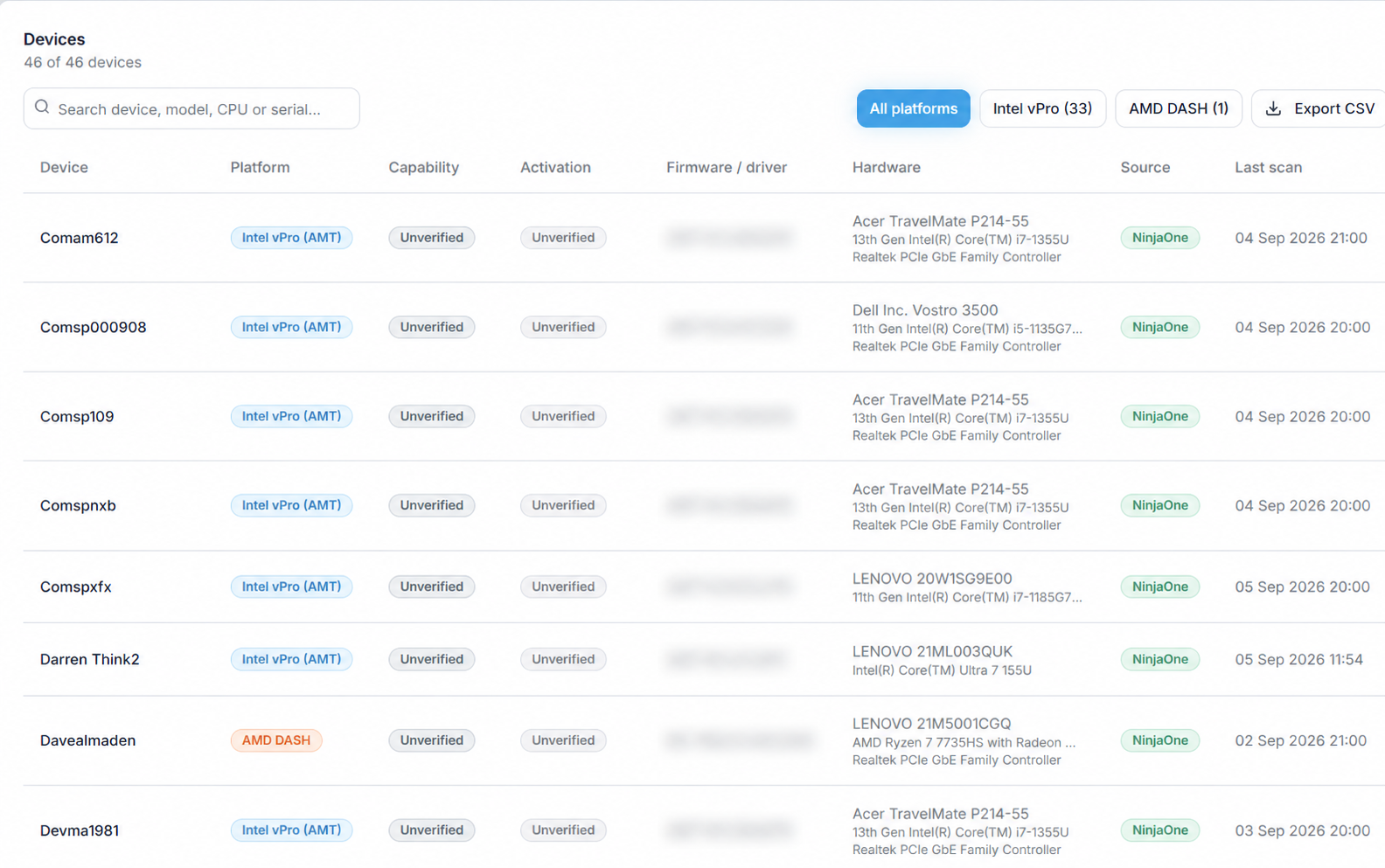
Hardware-level management introduces another dimension.
Intel vPro systems incorporating Intel AMT can provide OOB management capabilities independently of the installed operating system when those capabilities have been appropriately configured and provisioned. AMD DASH provides standards-based management capabilities on supported AMD commercial systems.
For support teams, this can be extremely valuable.
From a security perspective, however, it also means OOB management needs to be included in the access review.
The important distinction is between capability and configuration.
Discovering that a computer is vPro or DASH capable does not mean that somebody currently has OOB access to it. But it tells the MSP that another potential management plane exists and may warrant verification.
This becomes particularly relevant when inheriting devices from another MSP or IT provider that may previously have deployed OOB management.
The question becomes:
Was this capability ever provisioned, and if so, is the previous configuration still present?
An MSP offboarding checklist isn't enough
MSP transitions frequently rely on checklists.
Remove RMM.
Remove remote access.
Disable technician accounts.
Transfer Microsoft 365 administration.
Rotate credentials.
Revoke delegated access.
These are all necessary steps, but a checklist records what somebody believes they have removed.
Discovery provides independent evidence of what remains.
That is an important difference.
A departing MSP may follow its offboarding procedure perfectly and still miss a laptop that hasn't connected for six months. When that laptop eventually reconnects, continuous discovery can identify software that no longer conforms to the new MSP's expected management baseline.
This turns MSP transition security from a one-time exercise into an ongoing control and provides true Operational Visibility.
Establishing an approved remote-management baseline
The most useful approach is to define what should exist. For example, a customer might have an approved baseline consisting of:
Management capability | Expected state |
|---|---|
Current MSP RMM | Required |
Current MSP remote access | Approved |
Microsoft Intune | Approved |
Previous MSP RMM | Prohibited |
Previous remote-access platform | Prohibited |
Other unattended remote access | Investigate |
Intel vPro / AMD DASH | Approved where managed |
Unknown management agent | Investigate |
CIQ Cloud can then help identify deviations from that expected state.
This changes the problem from manually searching thousands of installed applications to identifying exceptions. And exceptions are where the interesting security questions usually exist.
From discovery to continuous governance
The problem doesn't end after onboarding.
A clean environment today can develop new remote-access exposure tomorrow.
A software supplier may install a support tool. An employee may install a remote-access application. An acquisition may introduce devices managed by another RMM platform.
This is where the CIQ Cloud Operational Visibility lifecycle becomes particularly relevant:
Discover → Monitor → Understand → Govern → Optimise

Discover the RMM, remote-access and potential OOB management capabilities present across the estate.
Monitor for changes and newly appearing management technologies.
Understand whether they represent expected tools, legitimate exceptions or potential risks.
Govern which remote-management technologies should be permitted.
Optimise the environment by removing unnecessary tools and reducing the number of unmanaged access paths.
The objective is not simply cleaner software inventory.
It is a reduction in the customer's remote-management attack surface.
A stronger MSP onboarding process
This creates an opportunity to make remote-access discovery a formal part of customer onboarding.
Rather than simply deploying the new management stack, an MSP could perform a Remote Management Exposure Assessment.
The assessment would identify known RMM agents, remote-access software and OOB-capable hardware and compare the results with the customer's approved management baseline.
Unexpected findings could then be investigated and documented.
The customer receives evidence that the incoming MSP has not simply installed another set of tools on top of whatever was already there. It has actively looked for previous and potentially unauthorised management paths.
That is a significantly stronger security proposition.
And a better MSP offboarding process
The same capability can work in reverse.
When an MSP relationship ends, the provider can demonstrate that its management agents and remote-access tools have been removed.
The incoming MSP can independently verify the environment.
That provides benefits to everyone involved.
The outgoing MSP can demonstrate responsible offboarding.
The incoming MSP gets a known starting point.
And the customer receives greater confidence that changing IT providers has not left forgotten privileged access behind.
Security and recoverability are two sides of the same question
There is also an interesting tension here. The technologies that increase endpoint recoverability can also increase the management attack surface. Having RMM, remote access and OOB management available can make a device considerably easier to support.
Having unknown or uncontrolled RMM, remote access and OOB management makes it potentially less secure.
The objective therefore shouldn't necessarily be to minimise remote-management capability. It should be to ensure that every management capability is known, authorised and controlled.
That is an important distinction.
Operational Visibility means knowing who could have access
Traditional asset inventory answers:
"What hardware and software do we have?"
Operational Visibility should go further:
"What does that mean operationally and from a security perspective?"
For remote management, that means understanding not only whether the MSP can reach an endpoint, but whether someone else potentially can too.
CIQ Cloud provides a visibility layer across the technologies already present in the environment, helping MSPs identify expected management tools, discover unexpected remote-access capabilities and investigate legacy access paths.
For an MSP taking responsibility for a new customer, that leads to a simple but important principle:
Don't just prove that you have access. Prove that the people who shouldn't have access no longer do.
Frequently asked Questions